

Please join us as as we congratulate these Tradeloop members who have been part of the trading community for 5 years or longer. Many have donated time to our all-volunteer Ethics Committee or provided other services to the community. All are valued members and we thank them for their commitment to Tradeloop.
Here are the members who celebrate their Tradeloop anniversary during the month of February:
February 2000
February 2002
February 2004
February 2005
February 2006
We want to thank these members for their commitment to the Tradeloop trading community. These companies - along with the many other Tradeloop users - work with us to promote ethical business standards, protect the value of the wholesale market, and police the community to prevent online fraud. Search the Tradeloop Dealer Directory to find even more Tradeloop wholesale members and registered users.
Subscribe

 Posts
All Comments
Posts
All Comments
Showing posts with label Dealer Directory. Show all posts
Showing posts with label Dealer Directory. Show all posts
Tuesday, February 8, 2011


Tuesday, December 14, 2010
Warnings About Non-Members
We have many non-members searching at Tradeloop, so we've added another security feature to email messages. You'll see a warning if the person emailing you is a non-member. 
When a non-member sends you an email using the email link on your Member Profile, the standard message now includes the text below:
It's easy to check someone's membership status at Tradeloop. Just search for the company or individual's name at the Dealer Directory link. Membership status is listed directly under the company or individual's name. Non-validated listings also display a small warning icon:
 Non-Member
Tradeloop Member
Are you sure the company you're dealing with is a Tradeloop member? Search the Dealer Directory and find out fast!
When a non-member sends you an email using the email link on your Member Profile, the standard message now includes the text below:
Tradeloop NON-MEMBERWe made this change in response to a Tradeloop member's suggestion that we highlight when a sender is not a Tradeloop member. That notation adds credibility to email leads that do come from Tradeloop members and warns members to take additional precautions before setting up a deal with a non-member.
It's easy to check someone's membership status at Tradeloop. Just search for the company or individual's name at the Dealer Directory link. Membership status is listed directly under the company or individual's name. Non-validated listings also display a small warning icon:
Non-MemberTradeloop Member
Are you sure the company you're dealing with is a Tradeloop member? Search the Dealer Directory and find out fast!
Thursday, July 29, 2010
Better Search Results In Tradeloop's Dealer Directory
We've enhanced the search function for Tradeloop's Dealer Directory to increase the usability and accuracy of search results. Now when you search, the dealer's phone number and email address displays in the results list. Members can now contact each other directly from the search results instead of having to navigate to the company profile to find that information.
In another change, the new search function ignores special characters in company names when displaying results. Previously, if you were searching for "X-Y-Z Company," you had to enter the company name with the dashes. But now, searches on "XYZ" will return results for "X-Y-Z Company" - and any other dealers that match that search term.
The directory also has an advanced search function, that allows you to search by member information, geographic region, and/or company specialty in a single click.
Both search enhancements improve Tradeloop's new Connections system as well; the Dealer Directory is the primary way to find other dealers to connect with. Have you created your own dealer network within Tradeloop yet? Remember that any member with 10 approved Connections by October 1, 2010 is automatically entered to win a new iPad.
In another change, the new search function ignores special characters in company names when displaying results. Previously, if you were searching for "X-Y-Z Company," you had to enter the company name with the dashes. But now, searches on "XYZ" will return results for "X-Y-Z Company" - and any other dealers that match that search term.
The directory also has an advanced search function, that allows you to search by member information, geographic region, and/or company specialty in a single click.
Both search enhancements improve Tradeloop's new Connections system as well; the Dealer Directory is the primary way to find other dealers to connect with. Have you created your own dealer network within Tradeloop yet? Remember that any member with 10 approved Connections by October 1, 2010 is automatically entered to win a new iPad.
Tuesday, July 6, 2010
New Searchbox Increases Usability at Tradeloop's Web Site
We've updated the search boxes at Tradeloop to make the search function easier to use and understand. The most noticeable change is that the search boxes are more prominent - displayed at the top of the home page, Broadcast page, Trading Floor, Ethics Case list, and other areas. They also offer helpful tips about search terms and keywords.
For instance, here's the Home page search box. It's the same as the Trading Floor search and reminds you that you can search on a number of different options:

The Broadcast search box invites you to enter either the Broadcast Subject or a term found in the body of the Broadcast message, whether it's a generic term like "laptop" or a specific part number.
 And we recently added a search function to the posted Ethics cases. Because this is a relatively new feature, we've included some tooltips to help users understand the search function. Just click on the small blue dot with the question mark for an explanation of different search options:

The Tradeloop Dealer Directory also has a new search box with text to remind you that it's possible to search by company name, individual names, phone numbers, and many more keyword combinations.
We encourage you to visit the Tradeloop Web site and try the new search boxes. Do you think they're more useful and easy to understand? Are there some features and options that you think could benefit from additional tooltips? Let us know! Leave your comments and suggestions here at the member blog.
For instance, here's the Home page search box. It's the same as the Trading Floor search and reminds you that you can search on a number of different options:

The Broadcast search box invites you to enter either the Broadcast Subject or a term found in the body of the Broadcast message, whether it's a generic term like "laptop" or a specific part number.
 And we recently added a search function to the posted Ethics cases. Because this is a relatively new feature, we've included some tooltips to help users understand the search function. Just click on the small blue dot with the question mark for an explanation of different search options:
The Tradeloop Dealer Directory also has a new search box with text to remind you that it's possible to search by company name, individual names, phone numbers, and many more keyword combinations.
We encourage you to visit the Tradeloop Web site and try the new search boxes. Do you think they're more useful and easy to understand? Are there some features and options that you think could benefit from additional tooltips? Let us know! Leave your comments and suggestions here at the member blog.
Monday, June 28, 2010
User Profile Messages Highlight Trial Members & Banned Dealers
We've added two new classifications to company and user profiles in Tradeloop's member directory. There are now four profile classifications:

And a company that's banned from Tradeloop due to an Ethics violation will have this notation in its profile:
 Look for these new classifications when you're visiting other dealers' member and company profiles. And please, share your thoughts here at the Tradeloop member blog.
- Member
- Trial Member
- Non-member
- Banned - Ethics Violation

And a company that's banned from Tradeloop due to an Ethics violation will have this notation in its profile:
 Look for these new classifications when you're visiting other dealers' member and company profiles. And please, share your thoughts here at the Tradeloop member blog.
Tuesday, March 9, 2010
Upload Your Company Logo To Tradeloop
Reinforce your your brand and promote your company to Tradeloop members. Upload your company logo and display it on your Company Profile page.
Click on the "My Profiles" link under the Account tab. Look for the "Upload Logo" graphic to the right of your company name:
 Click on the graphic and you'll be taken to the "Upload Logo" page where you can upload the file from your computer.
Logos must meet these requirements:
Click on the "My Profiles" link under the Account tab. Look for the "Upload Logo" graphic to the right of your company name:
 Click on the graphic and you'll be taken to the "Upload Logo" page where you can upload the file from your computer.
Logos must meet these requirements:
- File format must be GIF or JPG
- The image should not be larger than 100k file size.
- The image display size should be no larger than 138 pixels wide by 65 pixels high.
- The image should not contain anything offensive.
Wednesday, March 3, 2010
New "Advanced Search" Page For Dealer Directory
The new "Advanced Search" function makes it even easier to find an individual member or member company in Tradeloop's Dealer Directory. The revised format lists the options in a search form that allows you to search by member information, geographic region, and/or company specialty in a single click.
Using the mix and match option, you can quickly drill down and search on an individual's name, company name, country, state, and more. Looking for a company in Florida that specializes in asset recovery and liquidation or an IT consultant in Dubai? No problem: just select those option in the Advanced Search form and have the information you need in seconds.
Here's a partial screen shot of the new search form:

Access the Advanced Search form directly or click on the Advanced Search link on the Tradeloop Dealer Directory main page.
Using the mix and match option, you can quickly drill down and search on an individual's name, company name, country, state, and more. Looking for a company in Florida that specializes in asset recovery and liquidation or an IT consultant in Dubai? No problem: just select those option in the Advanced Search form and have the information you need in seconds.
Here's a partial screen shot of the new search form:

Access the Advanced Search form directly or click on the Advanced Search link on the Tradeloop Dealer Directory main page.
Sunday, February 7, 2010
Notebooks/Laptops Specialty Category Added to Dealer Directory
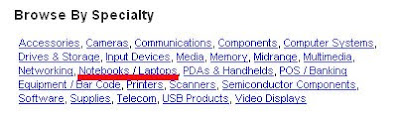
We've made it easier for Tradeloop customers to identify dealers who specialize in notebooks and laptops. You can search directly from the Dealer Directory page for dealers who offer these popular items and who list those specialties in their company profile information.
This new option is listed under the "Browse by Specialty" category and highlighted in red in the image below (but not on the Web site!).
 If you're a dealer in that specialty, be sure to add it to your company profile. Here's how:
This new option is listed under the "Browse by Specialty" category and highlighted in red in the image below (but not on the Web site!).
 If you're a dealer in that specialty, be sure to add it to your company profile. Here's how:
- Go to your Account Home Page
- Under the "Your Profiles" category, select Edit Profiles
- Select Category Specialties and add/change your specialties by checking or unchecking the boxes next to the category names.
Friday, October 16, 2009
Use the Dealer Directory to Search for Dealers by Continent, Country, or City
Looking for a reseller in Tauranga City, New Zealand or Wroclaw, Poland? What about Montevideo, Uruguay or Winnipeg, Canada? It's easy to find them using Tradeloop's Dealer Directory. You can search by country and city and/or filter results by company name, business specialty, primary business, and more.
Use the drop down search boxes to search by country and city. Filter your results further by searching on a particular company name, person's name, phone number, or postal code. Still too many search results? Tradeloop's search options give you even more choices.
Just select one of the other search options on the page. For instance, here's how to find a recycling/disposal company in Texas:
Use the drop down search boxes to search by country and city. Filter your results further by searching on a particular company name, person's name, phone number, or postal code. Still too many search results? Tradeloop's search options give you even more choices.
Just select one of the other search options on the page. For instance, here's how to find a recycling/disposal company in Texas:
- Select United States in the country drop down box.
- Select Texas in the State box.
- Refine the search even more (if needed) and limit the search to a particular city in Texas.
- Page down to the "Browse by Primary Business" section and select "Recycling/Disposal."
- Browse Alphabetically
- Browse by Geography
- Browse by Specialty
- Browse by Primary Business
- Browse by Manufacturer
Subscribe to:
Posts (Atom)