TRADELOOP

Tradeloop's Member Blog And News: Connections System

Promote Yourself

Does your company have a story that might interest our membership?

Let us know and you may see your name in print. We're looking for members to write case studies on. Contact us here.
Showing posts with label Connections System. Show all posts

Friday, April 1, 2011

Connect With Over 40,000 Validated Tradeloop Users Worldwide

We're celebrating a milestone this week at Tradeloop: our Customer Support staff validated the account application of our 40,000th Tradeloop user! That's 40,000 potential buyers and sellers you can contact with confidence. This is no small task. Our account screening protocols are so rigorous that Tradeloop staff requests additional information on 75% of applications.

Account validation is our first-line defense in combating fraud. Other anti-fraud systems are initiated by the Tradeloop community:
  • Flag Member Account: Alert us to Tradeloop users that you think need extra scrutiny
  • Fast Track Fraud Alerts: Ask the Ethics Committee to send a warning to the community about fraud.
  • Ethics Process: Resolve business disputes with other dealers. Our emphasis is on amicable resolution of disputes, but the Ethics Committee can - and will - ban dealers for non-participation in the process or unethical business conduct.
Even our Connections system - Tradeloop's internal social networking tool - provides an added layer of protection. Make Connections with other dealers and create your own trusted network within Tradeloop. Use new Broadcast options to buy and sell with just your trusted network.

Connecting with other Tradeloop dealers is easy. Just click on the "Network Connections" link under the My Account tab at the Tradeloop Web site. There are 40,000 validated users waiting to hear from you!

Search the dealer directory and start making Connections.

Thursday, February 3, 2011

New Search Options: Find People & Parts More Quickly

Searching Tradeloop just got easier with the launch of our new universal search box. Search the Trading Floor, Dealer Directory, Broadcasts, or Ethics cases from any place in the site. We've also improved the search function in the Dealer Directory: it now returns more relevant results, more quickly.

Have you noticed the new search box? It uses a drop-down menu with different options so you can target your search to a particular area:

The new search at Tradeloop's Dealer Directory supports multiple word searches. You can now enter a member's full name and navigate directly to his/her profile instead of searching just by last name. This will make it even easier to find and invite people to join your trusted network of dealers using our Connections system.

Try the new Dealer Directory search or search the Trading Floor now!

Tuesday, November 30, 2010

iPad Contest Extended - Make Ten Connections Before December 31

The response to our iPad contest has been extraordinary, so we've extended the deadline until December 31. Just make ten approved Connections before then and you're automatically entered into our drawing for a free iPad.

Many Tradeloop members are building their own private networks and there are a lot of open Connections requests. We want to enter every Tradeloop user into the drawing, so check your Connections page and respond to your invitations. Make at least ten Connections and you could be the winner on December 31.

It's easy to create your own dealer network:
  1. At the Dealer Directory, search for individuals you want to add to your Trusted Network.
  2. Go to the person's profile page and click on the "Add name to your Network" link.
  3. Type a short personal invitation at the "Request Connection" page.
  4. The Manage Connections link on your Tradeloop Account Home page displays the status of your network. It tells you who's Connected, who's invited you to join their networks, and lists the invitations you've sent.
This is your last chance! Send out your own Connections invitations and respond to the ones you receive. You could be the lucky Tradeloop member who celebrates the new year with a new iPad.

Learn more about the drawing at our official iPad Contest page.

Thursday, November 18, 2010

iWant To Win An iPad - Don't You?

Time is running out to win a free iPad from Tradeloop. Any Tradeloop member or registered user who makes at least 10 approved Connections is automatically entered in the drawing. One lucky person will get an early present from Tradeloop.

Just entering the contest makes you a winner. You'll have a circle of trusted partners and your own private trading network. Tradeloop's Connections system allows you to:
There are no forms to fill out, no purchase necessary, and nothing to mail. Anyone with ten approved Connections is automatically entered in the drawing. Learn more at our official iPad Contest page or go directly to the Dealer Directory and start making Connections.

Do it today: there's not much time left!

Thursday, November 4, 2010

Are You In the Drawing For A Free iPad?

There's still time to qualify to win a free iPad from Tradeloop. Just make ten approved Connections and you're automatically entered into the drawing. Our new Connections system lets you set up your own trusted network of dealers inside Tradeloop. Some features of the system include:
  • Privacy options: You decide how much information to share about your network.
  • Private Broadcasts: Send Broadasts just to your network or individual members inside your network.
  • Inventory search: Search the inventory of individual dealers in your Network.
Making Connections is easy:
  1. From the Dealer Directory, search for individuals you want to add to your Trusted Network.
  2. Go to the person's profile page and click on the "Add name to your Network" link.
  3. Type a short personal invitation at the "Request Connection" page.
  4. The Manage Connections link on your Tradeloop Account Home page displays the status of your network: who's Connected, who's invited you to join their networks, and invitations you've sent.
Learn more at our official iPad Contest page or go directly to the Dealer Directory and start making Connections.

Tuesday, October 26, 2010

Picture Yourself on Tradeloop - Upload Your Photo Now


Have you ever wanted to see who's on Tradeloop? Not just their company name or contact information or Broadcasts, but a photo too? Now you can. Scroll through your Trusted Network to view user pictures and upload your own photo to your Tradeloop member profile to personalize your account with a photo of yourself.

See the photos to the right? These Tradeloop members have added a personal photo to their individual profiles. It's quick and easy. Just visit your profile page and follow the instructions to upload your photo.

Photo upload requirements:
  • File type: For best results, we recommend one of the following formats: JPEG, GIF, or PNG.
  • Image size: 85 x 85 pixels
  • File size: 100k
You can delete your photo and/or upload a new photo at any time. Modify your privacy settings to set rules for who can - and can't - view your profile picture.

This is a quick and easy way to personalize your Tradeloop account. Add your personal photo now.


Tuesday, October 19, 2010

Buy & Sell With Just Your Trusted Network

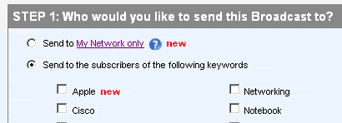
Tradeloop's "Send a Broadcast" page is now easier to use. In response to member suggestions, we modified the page layout slightly to help you select your "Send" options.

When creating a Broadcast, you can either send it to particular subscriber lists or create your own private Broadcasts for members of your Network only. Select either option by clicking on the appropriate radio button:

When you select the "Send to My Network only" option, the keyword checkboxes disappear. That eliminates confusion about whether you need to select both "My Network" and further narrow the recipients by keyword. Here's how the page section looks when you select the "My Network" option:

If you decide to send your Broadcast to particular keyword lists instead, just select that radio button and the checkboxes reappear.

Do you have any comments or suggestions about this Tradeloop feature - or any other features? Share them with us and other members here at the blog.

Thursday, October 14, 2010

New Privacy Settings For Your Tradeloop Network

Tradeloop's new Connections system lets you create your own trusted network of dealers and now we've added additional privacy options. You control how much information is available about you and your network and decide who can see your member profile, your photo (if you've uploaded one), your network, and even your email address.

Visit your account's privacy settings page to edit/update these options. The privacy levels range from totally open (anyone can view your information) to completely hidden (nobody can see it). Select the privacy options that work best for you right now. You can change them whenever you want, as often as you want.

We encourage all Tradeloop members to form their own personal networks of trusted dealers and we're offering this incentive: a chance to win an iPad! Make at least 10 approved Connections and you're automatically entered to win.

Update your privacy options and start making Connections now.

Thursday, September 30, 2010

Create A Private Broadcast List At Tradeloop

Send your Broadcasts to just your Trusted Network or even to individual dealers within your network with the new Broadcast option at Tradeloop. Use the "Send to My Network Only" option at the top of the "Send a Broadcast" page:


You can even send your Broadcast just to individuals in your Network. The Broadcast preview page lists all the members of your Network. Leave all boxes unchecked to send the Broadcast to your entire Network or click the checkbox to exclude one or more members.

For instance if your Broadcast is a WTB for a Dell part and some members of your Network only handle Compaq, you can check the boxes next to those names and exclude them from the Broadcast.

This new option is just one benefit of our new Connections system at Tradeloop. Have you started making Connections and creating your own trusted network of dealers? Now is the time to start: just ten approved Connections automatically enters you in our drawing for a free iPad!

Learn more at our official iPad Contest page or go directly to the Dealer Directory and start making Connections.

Tuesday, September 28, 2010

A Free iPad Is Going To A Tradeloop User. Could It Be You?

There's still time to win a free iPad from Tradeloop! Just make 10 approved Connections and get started creating your own Trusted Network of dealers within the Tradeloop community. That's all you have to do - no forms to fill out, no emails required, and no purchase necessary. When we draw for the iPad, anyone with 10 approved Connections is automatically entered to win.

Here's how:
  1. From the Dealer Directory, search for individuals or companies you'd like to add to your Trusted Network.
  2. Go to the person's profile page and click on the "Add name to your Network" link.
  3. That link takes you to the "Request Connection" page where you can type a short personal invitation.

  4. The Manage Connections link on your Tradeloop Account Home page displays the status of your network: who's Connected, who's invited you to join their networks, and invitations you've sent.
Learn more at our official iPad Contest page or go directly to the Dealer Directory and start making Connections.

Wednesday, September 15, 2010

Broadcast Just To Your Trusted Network On Tradeloop

Use Tradeloop's new "Send to My Network" Broadcast option to send your Broadcasts to the entire Tradeloop community or just to the trusted network you built using Tradeloop's Connections system.

The new Broadcast option is at the top of the "Send a Broadcast" page. Select the "Send to My Network only" radio button or scroll down on the page to select relevant subscriber lists for your Broadcast. You can even manage your connections from the Broadcast page. Just click on the "My Network only" link to view your approved Connections and view pending Connections.

Here's a screen shot from the Broadcast page:

Note that when you send a Broadcast to just your network, the message is only visible to people in your network!

You can even send messages just to individual members of your network. Once you enter your Broadcast text and go to the "Preview Broadcast" page, you'll see a list of your network members. By default, the Broadcast goes to all your network members, but you can exclude one or more members by checking the "Exclude" checkbox next to their name.

Now is the time to be making connections within Tradeloop and expanding your dealer network. If you make 10 approved connections before October 1, you could win a free iPad (get more details about the contest and the system's privacy options).

The Connections system lets you build your own network of trusted dealers and even restrict your Broadcast messages to just your network. Start building your network today.

Thursday, July 22, 2010

New Inventory Search Option: Search the Inventory List of Individual Dealers

A new Trading Floor search option gives you more flexibility: search on inventory posted by all dealers or on inventory posted by a particular dealer. If you're using the Connections system to set up your own trusted network of dealers within Tradeloop, this is a way to quickly check the inventory of those dealers first. If they don't have what you need, you can broaden your search to the entire Tradeloop community with just one click.

Here's how it works:
  • Go to the user profile or company profile of the dealer/company you want to search.
  • Click on the inventory total link

  • You'll be taken to the Trading Floor where you'll see the dealer's complete inventory list. Use the search box to find a particular item.
  • Toggle between the dealer's inventory listings and all dealer listings using the radio buttons next to the search box:

Learn more about Trading Floor search functions and/or how to create your own dealer network with our Connections system. Remember that we're offering a chance to win an iPad: just add 10 new approved Connections to your trading network before October 1, 2010 and you're automatically entered to win.

Monday, July 19, 2010

New Privacy Options For Tradeloop Connections System

Tradeloop members use our new Connections system to create their own dealer networks within Tradeloop. The system is similar to LinkedIn, but offers more security because it's limited to the Tradeloop community. And now, we've added additional privacy options that let members decide how much information (if any) to share about their networks.

We updated the system at the suggestion of a Tradeloop member who told us that he would rather not share the identities of the members in his network. At Tradeloop, member privacy is one of our main priorities, so we created these new privacy options:
Privacy Settings can be adjusted to allow users to:
  1. Make their Tradeloop Connections Networks visible to (or hide from) the public.
  2. Make their Tradeloop Connections Network visible to (or hide from) members.
  3. Make their Tradeloop Connections Network only visible to other people in their Tradeloop Connections Network.
  4. Make their Tradeloop Connections Network totally private
Visit Profile Settings to adjust Network Privacy Settings.
You decide how much information to share about your Network. Just visit your Account Profile to adjust your privacy settings.

We encourage all Tradeloop members to form their own personal networks of trusted dealers and we're offering this incentive: a chance to win an iPad! Make at least 10 approved Connections before October 1, 2010 and you're automatically entered to win.

Have you used the Connections system? Share your experience here at Tradeloop's member blog.

Thursday, July 15, 2010

Make Connections at Tradeloop & Win a Free iPad.

On October 1, 2010, one lucky Tradeloop user will win an iPad. That person could be you. Just make 10 approved connections Tradeloop iPad contestin our new Connections system and you'll be automatically entered to win.

The rules are simple: all you need to do is build your personal dealer network through the Connections system (learn more about how it works):
  1. Each user must get ten approved connections.
  2. One of our amazing users will win a free revolutionary iPad.
  3. Non-Members are eligible to make connections and receive Broadcast and Search Tradeloop with no monthly fee.
The Connections system allows you to form your own personal network of trusted dealers and find new business opportunities. With our new privacy options, you decide how much information to share about your Network. You can make your entire Connections Network visible to the public, to other Tradeloop members only, to other people in your Network, or even make it totally private. Visit your Account Profile to adjust your privacy settings.

Remember, you have to make 10 approved connections before October 1st and you'll be automatically entered to win the iPad. Don't wait until the last minute; start building your Network today.

See official rules for eligibility and more information.

Monday, June 7, 2010

Create Your Own Dealer Network With Tradeloop's New Connections System

Use Tradeloop's new Connections system to form your own personal network of trusted dealers and find new business opportunities. The Connections system is similar to LinkedIn, but offers more security because it's limited to the Tradeloop community.

You can invite any Tradeloop member or registered user to join your network. Here's how:
  1. Go to the person's profile page and click on the "Add name to your Network" link.
  2. That link takes you to the "Request Connection" page where you can type a short personal invitation.

  3. Visit your account's "Manage Connections" page to check the status of your invitation.
The Manage Connections link on your Tradeloop Account Home page shows you the members you've already connected with, members you've invited to join your own network, and who has issued invitations to you.
You'll receive a notification email when other members invite you to join their networks. Accept their invitation using the "Accept Connection" button in the email invitation you receive. You can also join from your account's "Manage Connections" page. The middle column lists "Pending Approvals," which are invitations you've received but not accepted yet.

Tradeloop's Connections system is launching today. Check it out and share your comments here at the member blog. We want to you what you think!