

We've enhanced the search function for Tradeloop's Dealer Directory to increase the usability and accuracy of search results. Now when you search, the dealer's phone number and email address displays in the results list. Members can now contact each other directly from the search results instead of having to navigate to the company profile to find that information.
In another change, the new search function ignores special characters in company names when displaying results. Previously, if you were searching for "X-Y-Z Company," you had to enter the company name with the dashes. But now, searches on "XYZ" will return results for "X-Y-Z Company" - and any other dealers that match that search term.
The directory also has an advanced search function, that allows you to search by member information, geographic region, and/or company specialty in a single click.
Both search enhancements improve Tradeloop's new Connections system as well; the Dealer Directory is the primary way to find other dealers to connect with. Have you created your own dealer network within Tradeloop yet? Remember that any member with 10 approved Connections by October 1, 2010 is automatically entered to win a new iPad.
Subscribe

 Posts
All Comments
Posts
All Comments
Thursday, July 29, 2010


Tuesday, July 27, 2010
Celebrating Tradeloop Member Anniversaries for July
This week, we're kicking off a regular monthly feature that highlights Tradeloop members who have been part of the trading community for 5 years or longer. We considered calling them "Trusted Users" or "Trusted Members," but our stringent membership verification procedures mean that all Tradeloop members are "trusted." Instead, we'll celebrate and honor our longtime members once a year during the month they joined Tradeloop.
And here they are!
July 1998 July 1999
July 2000
July 2001
July 2002
July 2004
July 2005
Do you have colleagues who haven't joined Tradeloop yet? Invite them to try out a 90-day membership through our "Refer a Friend" program. We'll give you a free month at Tradeloop for each person you refer who registers for a trial membership. Get started here.
And here they are!
July 1998
 July 1999
July 2000
July 2001
July 2002
July 2004
July 2005
- Compuquest 2000
- MSP Data Systems, Inc.
- Wildfire Systems Limited
- CMB Components, Inc.
- Terix Computer Service
- AMCL Technology, Inc.
Do you have colleagues who haven't joined Tradeloop yet? Invite them to try out a 90-day membership through our "Refer a Friend" program. We'll give you a free month at Tradeloop for each person you refer who registers for a trial membership. Get started here.
Thursday, July 22, 2010
New Inventory Search Option: Search the Inventory List of Individual Dealers
A new Trading Floor search option gives you more flexibility: search on inventory posted by all dealers or on inventory posted by a particular dealer. If you're using the Connections system to set up your own trusted network of dealers within Tradeloop, this is a way to quickly check the inventory of those dealers first. If they don't have what you need, you can broaden your search to the entire Tradeloop community with just one click.
Here's how it works:
Here's how it works:
- Go to the user profile or company profile of the dealer/company you want to search.
- Click on the inventory total link
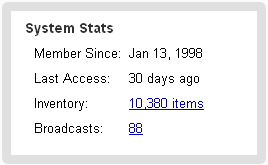
- You'll be taken to the Trading Floor where you'll see the dealer's complete inventory list. Use the search box to find a particular item.
- Toggle between the dealer's inventory listings and all dealer listings using the radio buttons next to the search box:



Wednesday, July 21, 2010
Upload Unlimited Inventory With A Standard Membership
Tradeloop's Trading Floor is more than a list of parts for sale. Use the information contained in the Trading Floor database to make pricing decisions, see who is searching on your inventory, and see a list of the most popular searches. All Tradeloop standard members can upload an unlimited number of parts and offer them for sale at Tradeloop.
Uploading is easy. You can either enter parts individually (which works for a small number of items) or upload a list of hundreds, perhaps thousands, of parts using a comma-delimited (.csv) file. Complete instructions for uploading are at the Tradeloop Web site.
We encourage all Tradeloop members to upload their inventory lists and use the Trading Floor to locate items and research the wholesale market.
Uploading is easy. You can either enter parts individually (which works for a small number of items) or upload a list of hundreds, perhaps thousands, of parts using a comma-delimited (.csv) file. Complete instructions for uploading are at the Tradeloop Web site.
We encourage all Tradeloop members to upload their inventory lists and use the Trading Floor to locate items and research the wholesale market.
- Tradeloop's Search History reports use the Trading Floor information to determine the most popular searches and tell you who has been searching on your listings.
- The Price History reports help you track price fluctuations over time. You can see the high, low, and average wholesale prices for individual part numbers. To view a parts price history, go to the Trading Floor, enter the part number, and click on the part number link to see a price history report on that item.


Monday, July 19, 2010
New Privacy Options For Tradeloop Connections System
Tradeloop members use our new Connections system to create their own dealer networks within Tradeloop. The system is similar to LinkedIn, but offers more security because it's limited to the Tradeloop community. And now, we've added additional privacy options that let members decide how much information (if any) to share about their networks.
We updated the system at the suggestion of a Tradeloop member who told us that he would rather not share the identities of the members in his network. At Tradeloop, member privacy is one of our main priorities, so we created these new privacy options:
We encourage all Tradeloop members to form their own personal networks of trusted dealers and we're offering this incentive: a chance to win an iPad! Make at least 10 approved Connections before October 1, 2010 and you're automatically entered to win.
Have you used the Connections system? Share your experience here at Tradeloop's member blog.
We updated the system at the suggestion of a Tradeloop member who told us that he would rather not share the identities of the members in his network. At Tradeloop, member privacy is one of our main priorities, so we created these new privacy options:
Privacy Settings can be adjusted to allow users to:You decide how much information to share about your Network. Just visit your Account Profile to adjust your privacy settings.
Visit Profile Settings to adjust Network Privacy Settings.
- Make their Tradeloop Connections Networks visible to (or hide from) the public.
- Make their Tradeloop Connections Network visible to (or hide from) members.
- Make their Tradeloop Connections Network only visible to other people in their Tradeloop Connections Network.
- Make their Tradeloop Connections Network totally private
We encourage all Tradeloop members to form their own personal networks of trusted dealers and we're offering this incentive: a chance to win an iPad! Make at least 10 approved Connections before October 1, 2010 and you're automatically entered to win.
Have you used the Connections system? Share your experience here at Tradeloop's member blog.
Subscribe to:
Posts (Atom)